
Interval Operations#
The Interval class provides several operations to manipulate and combine interval objects.
First, let’s create some simple intervals:
from temporaldata import Interval
import numpy as np

# Create two intervals: [1, 8] and [12, 18]
interval1 = Interval(start=np.array([1., 12.]),end=np.array([8., 18.]))

# Create three intervals: [2, 5], [7, 10], and [14, 17]
interval2 = Interval(start=np.array([2., 7., 14.]), end=np.array([5., 10., 17.]))
Typically for most operations that involve multiple Interval objects,
each Interval object must be disjoint and sorted.
You can check these conditions using:
interval.is_disjoint()  # Returns True if intervals don't overlap
interval.is_sorted()    # Returns True if intervals are sorted by start time
Intersection#
The intersection operation (&) returns a new Interval
containing only the overlapping time periods between two Interval objects.

# Compute intersection
intersection = interval1 & interval2

# Result will contain [2, 5], [7, 8] and [14, 17] as these are the overlapping periods
print(intersection.start)  # [2., 7., 14.]
print(intersection.end)    # [5., 8., 17.]
Union#
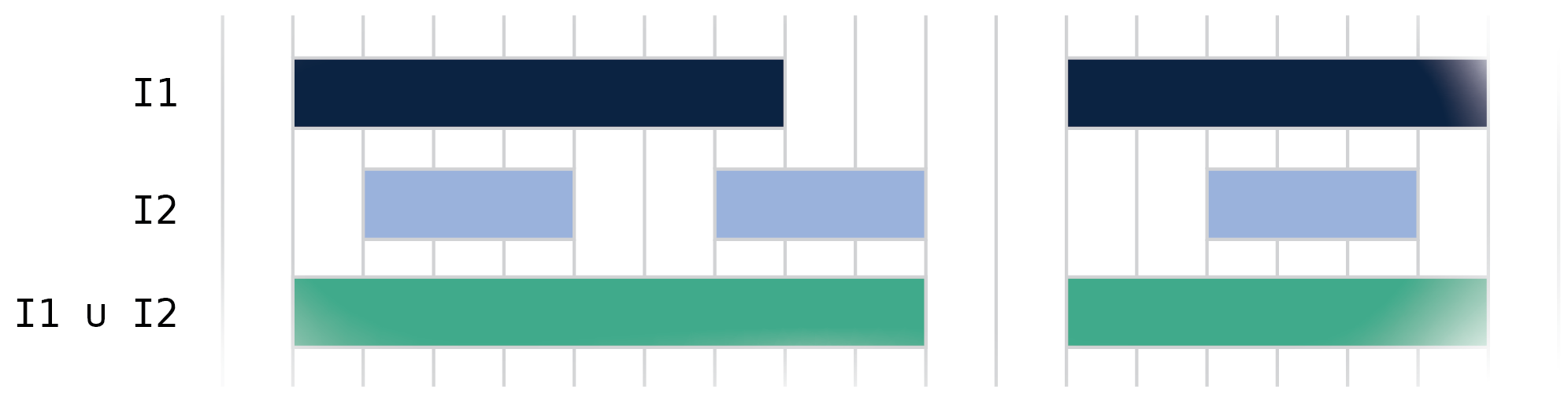
The union operation (|) returns a new Interval
containing the union of all intervals in both objects.
# Compute union
union = interval1 | interval2

# Result will contain [1, 10] and [12, 18]
print(union.start)  # [ 1., 12.]
print(union.end)    # [10., 18.]
Difference#
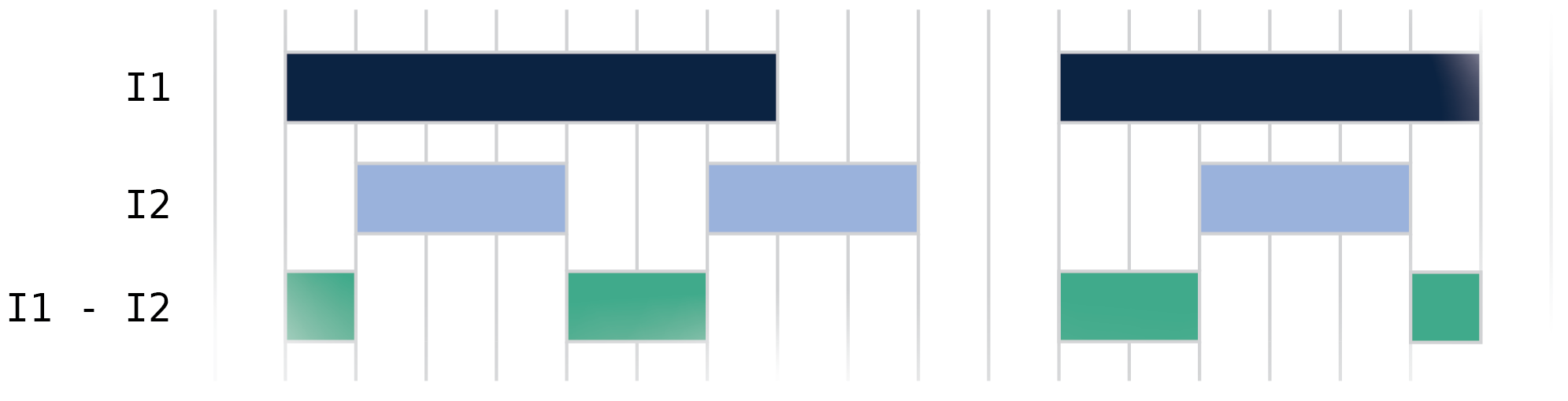
The difference operation (.difference()) returns a new Interval containing time periods that are in the first interval but not in the second interval.
# Compute difference
difference = interval1.difference(interval2)

# Results in intervals: [1, 2], [5, 7], [12, 14], and [17, 18]
print(difference.start)  # [1., 5., 12., 17.]
print(difference.end)    # [2., 7., 14., 18.]
Dilation#
The dilation operation (.dilate()) expands each interval by a specified amount on both sides. This is useful for creating buffer periods around intervals or merging nearby intervals.

# Create three intervals: [1, 5], [10, 13.5], and [14, 18]
interval = Interval(start=np.array([1.0, 10.0, 14.0]), end=np.array([5.0, 13.5, 18.]))

# Dilate by 0.5 on each side
dilated = interval.dilate(0.5)

# Results in intervals: [0.5, 5.5], [9.5, 13.75], and [13.75, 18.5]
print(dilated.start)  # [0.5 , 9.5 , 13.75]
print(dilated.end)    # [5.5 ,13.75, 18.5 ]
The dilation operation is particularly useful when you need to:
Create buffer periods around events
Account for uncertainty in interval boundaries
Merge intervals that are close together
Coalescing#
The coalesce operation (.coalesce()) merges overlapping or touching intervals into single continuous intervals. This is useful for simplifying interval sets and removing gaps below a certain threshold.

# Create four intervals [1, 6], [6.1, 11], [11.3, 14.5], and [14.5, 17.8]
interval = Interval(
    start=np.array([1., 6.1, 11.3, 14.5]), end=np.array([6., 11., 14.5, 17.8])
)


# Coalesce intervals that are within 0.2 of each other
coalesced = interval.coalesce(0.2)

# [6-6.1] and [14.5-14.5] merged, [11-11.3] unchanged
print(coalesced.start)  # [ 1., 11.3]
print(coalesced.end)    # [11., 17.8]
The coalesce operation is useful for:
Cleaning up noisy interval data
Merging intervals that are effectively continuous
Simplifying interval representations
You can combine coalesce with dilate to merge intervals within a certain distance:
# Create two intervals [1, 2.5], and [3, 4]
interval = Interval(start=np.array([1., 3.]), end=np.array([2.5, 4.]))

# Merge intervals within distance 0.5
merged = interval.dilate(0.5).coalesce()

print(merged.start)  # [0.5]
print(merged.end)    # [4.5]
There are multiple edge cases that can occur when performing interval operations. For more details, see Interval Operations - Edge Cases.